
Payments · KYC · 2023

Online Payment Activation
Before this project, FreshBooks mobile app lacked the workflows users needed to begin accepting online payments. The goal of this project was to help FreshBooks mobile users discover, activate, and manage payment gateways so they can get paid faster.
My role and contribution
Payment setup was buried inside the invoice flow, so users had trouble finding where to enable payment gateways. The app also gave limited guidance on what each gateway offered, what fees applied, or what setup steps were required.
This created two core user problems:
Users struggled to discover payment options
Users had to stumble into setup through invoicing.

Users felt confused about how online payments worked
Business owners needed to understand gateway options, fees, and verification requirements before activating online payments. Without that guidance in the mobile app, setup felt unclear and risky.

Payment configuration created high support volume, low payment gateway adoption, limited revenue opportunities, and missing mobile access to gateways like Stripe and PayPal increased the risk of churn.
The design challenge
How might we help business owners discover, learn about, active, set up, and manage payment gateways in the FreshBooks mobile app, so they can start accepting payment sooner?

Aligning the team through a workshop
To define the opportunity, we ran a cross-functional workshop with product, engineering, and payments stakeholders.
We looked at questions like:
→ How might users discover available payment gateways?
→ What information do they need before deciding to activate one?
→ What setup steps are required before they can receive money?
→ How should they manage payment methods after setup?
This helped the team align around a more complete product experience: not just enabling a gateway, but creating a system for payment discovery, education, setup, and management.
Mapping the payment activation workflow
Once we aligned on the experience, I mapped the end-to-end mobile workflow.
The workflow has to support several entry points:

→ This gave online payments a clearer home in the mobile app while still making in available in context.
A dedicated home for payment gateways
I created a new Online Payment Settings area where can could see all available payment gateways in one place.

→ This made payment setup discoverable outside the invoice flow.
Clearer gateway education
Early testing showed that users were hesitant to interact with payment gateways unless fees were clearly visible.
So we added clearer fee information directly on the gateway cards, including credit card and bank transfer fees.

→ This helped users evaluate payment options before committing.
Setup progress and reminders
Users also felt anxious when they could not tell whether their information was saved or what steps were left.
To reduce uncertainty, we added setup progress indicators and dashboard reminders that show users where they are in the process.

→ This made payment activation feel more guided and less like a black box.
Gateway management after setup
Once users completed setup, they can return to Online Payment Settings to manage payment methods, account details, payout schedule, bank information, and other connected gateways.
→ This turned payment activation into a reusable mobile settings infrastructure, not a one-time setup flow.
What we launched


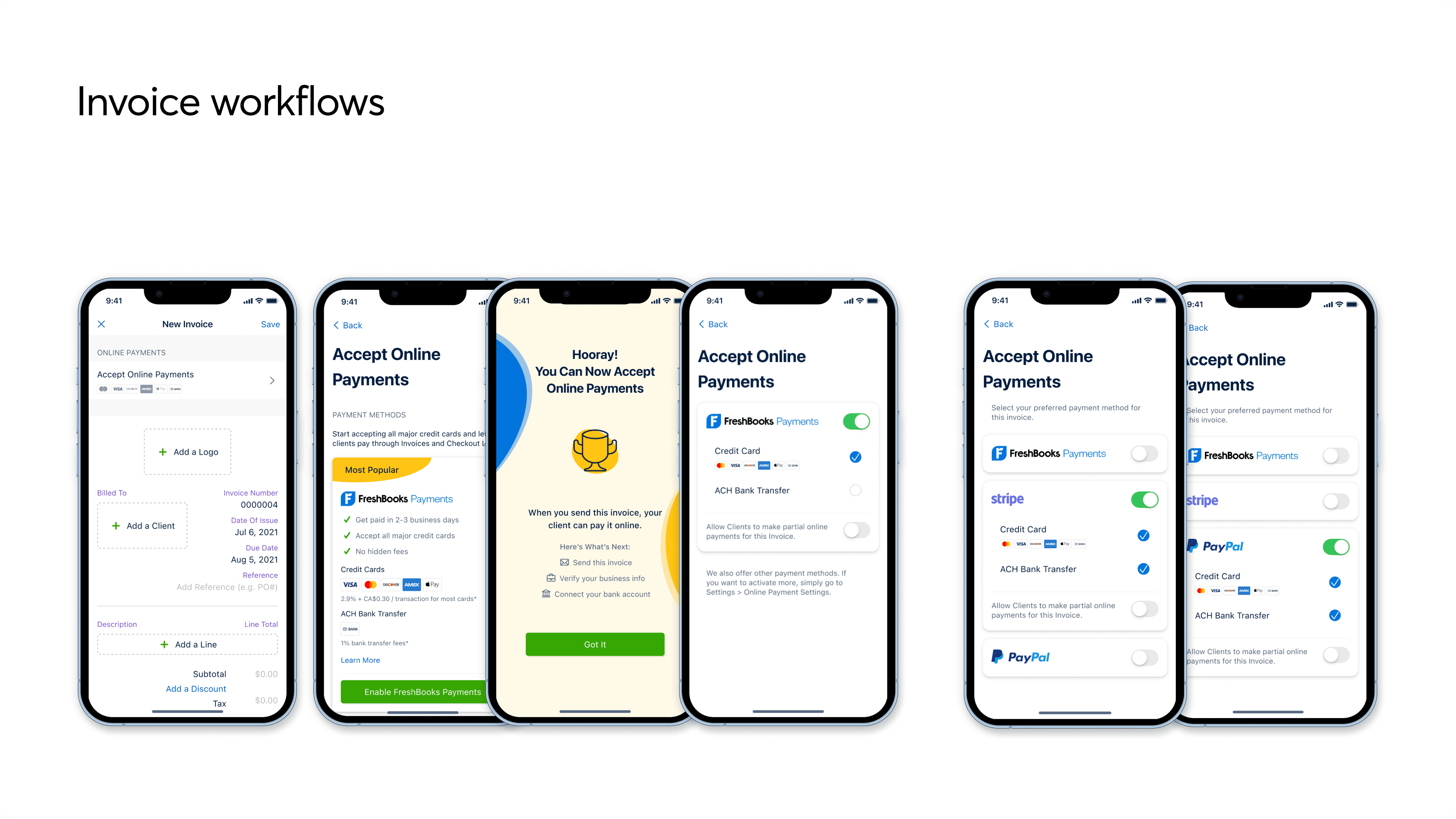
Post launch impacts
After launch, the new mobile payment activation experience improved discovery and reduced support friction.

The pivot: setup was still too hard
Post-launch data showed that gateway discovery had improved, but setup completion was still a major problem.

The issue was not lack of intent. Users wanted to finish, but the setup process made it too difficult.
At the time, users were redirected to WePay, the payment processor, to complete the remaining KYC steps. That external flow asked 34 questions on one screen, took around 10 seconds just to scroll to the bottom, and did not save information periodically. Users often had to stop, gather documents, and re-enter information later.

→ How might we reduce KYC set up frictions by keeping users in a guided, native mobile flow?
Designing a native KYC setup experience
To reduce drop-off, the new native setup experience breakes a long external form into smaller, more manageable steps:
→ Business structure
→ Business details
→ Business representatives
→ Business owner details

We also added an upfront checklist of required information, so users could understand what they needed before starting and revisit it during setup.

→ This helped to reduce set up drop-offs
The native KYC experience significantly improved setup completion.
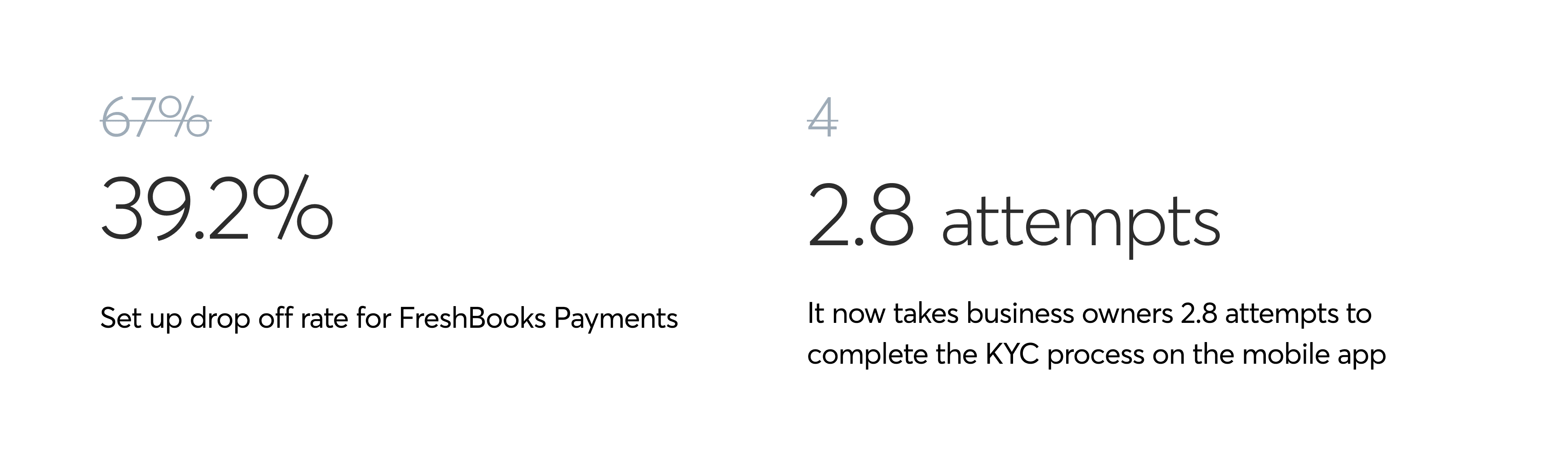
The first launch solved discoverability and gateway management issues. The pivot solved the deeper activation barrier: helping users finish the compliance-heavy setup required to actually receive payments.
What I learned and what I’d do differently
This project taught me that activation is not just about helping users start a flow. It is about helping them finish it.
Looking back, I would have pushed earlier to evaluate the full setup journey beyond FreshBooks-owned screens, especially because external partner flows can become the biggest source of user drop-off.