Building Jobber's Sales Pipeline from 01

Building Jobber's Sales Pipeline from 01

Building Jobber's Sales Pipeline from 01

A 0→1 product that unifies fragmented sales workflows into one flexible pipeline, helping home service businesses track opportunities, move work forward, and use AI to prioritize what needs attention

Designing Jobber’s first native Sales Pipeline from 0→1

Designing Jobber’s first native Sales Pipeline from 0→1

Product strategy · Information architecture · 2026

Product strategy · Information architecture · 2026

Product strategy · Information architecture · 2026

What is Jobber?

Jobber is a business management platform for home service providers, like plumbing, cleaning, landscaping, and HVAC, helping teams quote work, schedule jobs, manage customers, and get paid.

My role and contribution

My role and contribution

I helped shape Jobber’s first native sales pipeline from an ambiguous product gap into a successful V1 launch.

Reframed the problem from lead management to work management
Translated fragmented sales workflows into a simple pipeline model

Prioritized the MVP scope while shaping the product vision

Created the sales workflow foundation for AI prioritization, follow-up recommendations, and future sales automation
Impact:

3,000+ beta sign-ups, exceeding the original target by 7.5x

Reduced average lead-to-closed-won time by 12%, from 18 days 15.8 days.

I led the design of FreshBooks’ first native mobile payment activation and KYC setup experience, helping business owners enable online payments directly from the app.


Role: Lead Product Designer
Platform: iOS and Android
Impact:-10% support volume related to online payment setup
4% → 6.2% payment gateway adoption rate
67% → 39.2% setup drop-off rate after the KYC pivot
4 → 2.8 attempts to complete the KYC setup flow

Managing leads becomes harder as businesses grows

Managing leads becomes harder as businesses grows

As service businesses grow, managing leads from memory becomes harder. Teams need more visibility into what’s active, what needs follow-up, and what’s close to closing.


Our 2025 survey showed the gap clearly: only 32.3% of users managed leads using Jobber alone. Most relied on third-party tools, spreadsheets, whiteboards, or notes, a signal that Jobber was not giving them enough structure to manage leads.

As service businesses grows, managing leads became harder to do from memory. Teams need more visibility into what is active, what needs follow-up, and what is close to closing.

Our 2025 survey showed the gap clearly: only 32.3% of users managed leads using Jobber alone. The majority relied on third-party tools, spreadsheets, whiteboards, or notes, a signal that Jobber was not giving them enough structure to manage sales.

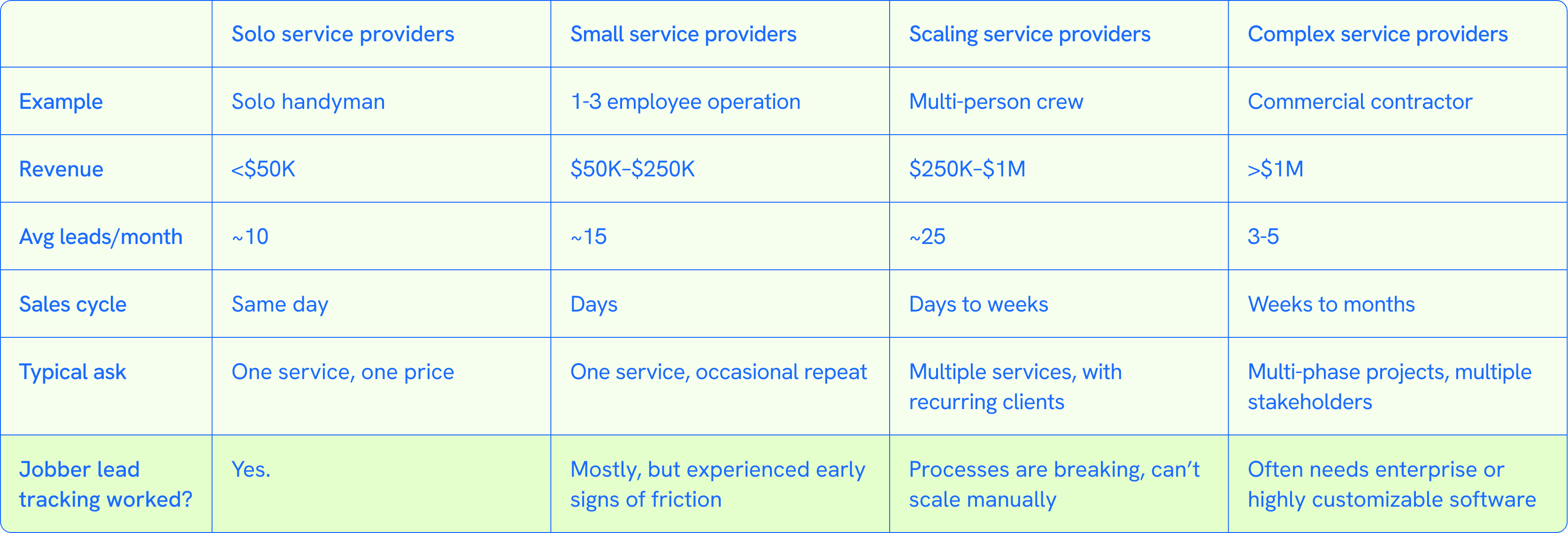
For solo service providers, tracking a few leads from memory could still work. But as teams, revenue, and lead volume grows, service providers need more visibility, structure, and flexibility.

The lead management problems we uncovered

The lead management problems we uncovered

Through research, three problems kept showing up.

  1. No clear way to tell where each lead stands

    “Every lead looks the same. I can’t tell what stage it’s in, is it in qualified, follow-up, or waiting on a decision?”

  1. Difficult to understand what happened with a lead

    “I’m piecing things together one tab at a time — notes in the client record, details in the quote.”

  1. No way to customize their sales process

    “Everyone sells differently. We do qualifications, follow ups, on-site visit, negotiation, nurturing. Without customization, I’m forced to track all of that in notes...”

  1. No way to customize their sales process

    “Everyone sells differently. We do qualifications, follow ups, on-site visit, negotiation, nurturing. Without customization, I’m forced to track all of that in notes…”

Reframing the problem from tracking leads to tracking sales work

At first, the problem looked like lead management. Service providers were asking for a better way to manage leads and clients. But research showed that lead tracking was only the symptom. What they really needed was a way to track the work required to move each lead toward a sale.

That shifted our direction from managing leads to managing the work required to move each sales opportunity forward.

The design challenge

The design challenge

Every service provider sells differently, with sales stages and processes shaped around their business. Despite those differences, we were able to identified a shared set of sales milestones.

Jobber already supported key milestones in the sales journey through workflows and features users knew and trusted.

But these sales workflows/features were fragmented across different product areas. To manage sales, users had to move between pages, piece together context, and rely on memory to track where each opportunity stands.

So the question became:


How might we create one flexible sales pipeline that reflects how each business sells, while still respecting the Jobber workflows and system logic users already relied on?

Shaping the solutions

Shaping the solutions

We explored different views to make sales work easier to see and manage.
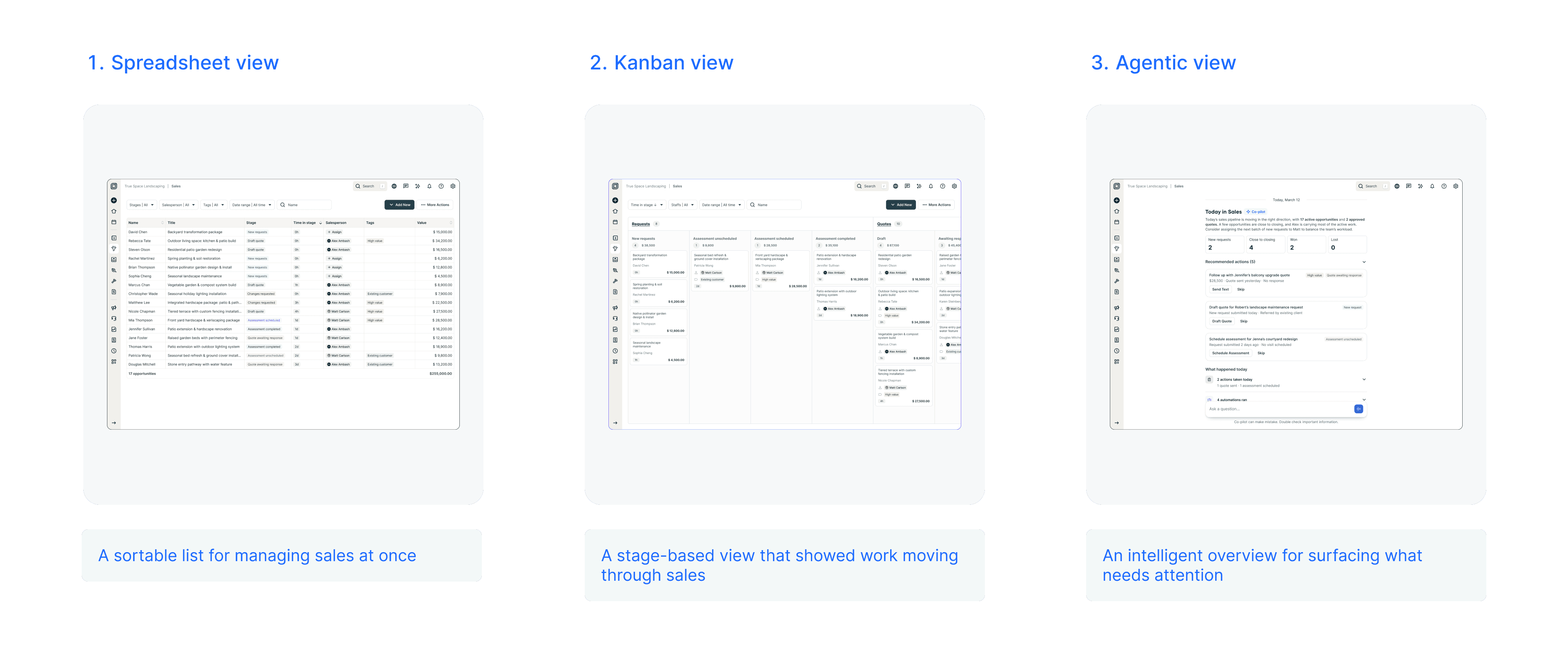
Spreadsheet made sales easier to scan, but not easier to understand. Agentic view helped with prioritization, but required trust too early.

We shipped Kanban as the V1 foundation, so users can see where sales work stands and act on it.

We connected the context behind each sales opportunity, so users can understand what has happened and make decisions faster.

→ We made the pipeline flexible, so users can customize sales stages to match how they actually sell.

In v2, we used AI to turn pipeline data into next steps, so users can prioritize what to do.

Outcome

Outcome

Sales Pipeline became the most successful beta launch in Jobber history, reaching 3,000+ sign-ups and exceeding the original 400-user target by 7.5x.

3,000+

beta sign ups

400

original target

7.5x

target reached

Sales Pipeline launched to GA in April 2026 and continued to show strong early traction.

Adoption

Adoption

Adoption

Workflow customization

Workflow customization

30-day retention

30-day retention

30-day retention

Lead to close-won time

17,591

17,591

17,591

39%

39%

39%

34%

34%

34%

-12%

unique users after GA launch

unique users after GA launch

of users configured stages

of users configured stages

Users who configured custom stages retained at a significantly higher rate

Users who configured custom stages retained at a significantly higher rate

of users returned after 30 days

of users returned after 30 days

Retention is strongest among scaling service providers, our core target segment

Retention is strongest among scaling service providers, our core target segment

average time to close won

Sales Pipeline helped service providers prioritize follow-ups and move leads forward faster

What I learned and what I’d do differently

What I learned and what I’d do differently

V1 made sales work visible. Looking back, I would have pushed earlier on whether visibility helped service providers prioritize the right work and win more of it.

V1 made sales work visible. Looking back, I would have pushed earlier on whether visibility helped service providers prioritize the right work and win more of it.

  1. Probe the why sooner

    I would have gone deeper on why visibility mattered — not just whether service providers could see their sales work, but how visibility helped them decide what to prioritize.

  2. Bring prioritization into V1 thinking

    The pipeline solved visibility, but the bigger question was whether it helped service providers close more work. I would have brought that question into the product strategy earlier.